Shopify Additional Scripts Deprecation Broke Your Post Purchase Survey
The Additional Scripts deprecation hit non-Plus Shopify stores on August 26. Tracking pixels have a documented fix. Post purchase surveys on the Thank you page do not, and the breakage is silent.
If your store is on Basic, Grow, or Advanced, something may have quietly stopped working today. August 26, 2026 is the Additional Scripts deprecation deadline for non-Plus stores: the Additional Scripts box, script tags, and legacy customizations no longer run on the Thank you and Order status pages. Plus stores went through the same change on August 28, 2025. Non-Plus stores got an extra year, and the year is up.
The dangerous part is how quiet it is. Nothing throws an error. Orders keep processing. The Thank you page still renders. Whatever your old scripts used to do just stops happening, and the first sign is usually a chart flatlining a few weeks from now.
Most of the coverage of this deprecation is about tracking pixels, and pixels do have a clear migration path. But plenty of stores also had a post purchase survey living in that box: a rating question, an attribution dropdown, an embedded form. That survey stopped collecting today too, and the fix for it is not the same one.
What exactly went away
Three things stopped working on the Thank you and Order status pages for Basic, Grow, and Advanced stores:
- The Additional Scripts box in checkout settings, deprecated since August 28, 2025 when it went view-only. As of today its contents no longer run.
- Script tags targeting those pages.
- Legacy customizations built on the old page infrastructure, including anything that depended on
checkout.liquid.
Whether this affects you depends on how your survey was set up. The established survey apps moved to checkout UI extensions a year ago, when the Plus deadline forced them to. If your survey comes from an app that is still actively maintained, you're fine. The stores that broke today are the ones still running code somebody pasted into the Additional Scripts box years ago and nobody has touched since.
If you're not sure which camp you're in, open Settings → Checkout in your Shopify admin. If the Additional Scripts box has anything in it, that code is now dead weight, and whatever it did needs a new home.
The free fix covers content, not questions
Shopify's answer for post-purchase page content is its own free app, Checkout Blocks. On Basic and above it lets you place static and dynamic content blocks, text, images, and buttons, on the Thank you and Order status pages. No code, no cost, and for a lot of what lived in Additional Scripts it's a fine replacement.
But it can't ask a question. Shopify's own docs say so directly:
The custom field can't be added to post-purchase pages, such as the thank you or order status page.
The reason given is that this information "must be captured before the order is completed." So Checkout Blocks can display anything you want after the purchase, and capture nothing.
That draws a clean line through what you lost today:
- A link to an external form is replaceable for free. Add a content block with a button pointing at your survey. Five minutes, no app.
- A survey that collects the answer on the page is not. Capturing input on post-purchase pages requires a checkout UI extension, and extensions come from apps.
The difference matters more than it sounds. A link to an external form gets a fraction of the responses an on-page question does, because it asks the customer to leave the page and start over somewhere else. If your survey worked because it was one tap on the confirmation screen, a button to a form elsewhere is not the same survey.
Attribution broke twice on the same page
There's a second layer to this if your survey was the attribution kind.
Most stores measure where customers come from in two ways. Ad platform pixels tell you what the platforms claim. A "How did you hear about us?" question tells you what the customer says. These are different measurements and they routinely disagree, which is exactly why running both is useful: the gap between them is information.
On a store that didn't migrate, both went quiet today, on the same page, for the same reason. The pixel side has a documented fix and plenty of guides. The self-reported side is the one that's easy to forget to rebuild, because nothing reminds you it existed. If you rebuild your pixels and skip the survey, you've kept the inferred number and lost the customer's own answer.
A Shopify survey app built on the new checkout
Our Shopify survey app, FT Post Purchase Surveys, runs as a checkout UI extension, the architecture Shopify is moving everyone to. Today's deadline doesn't touch it. It has asked customers for a satisfaction rating on the Thank you page since launch, and as of this week it asks the attribution question too.
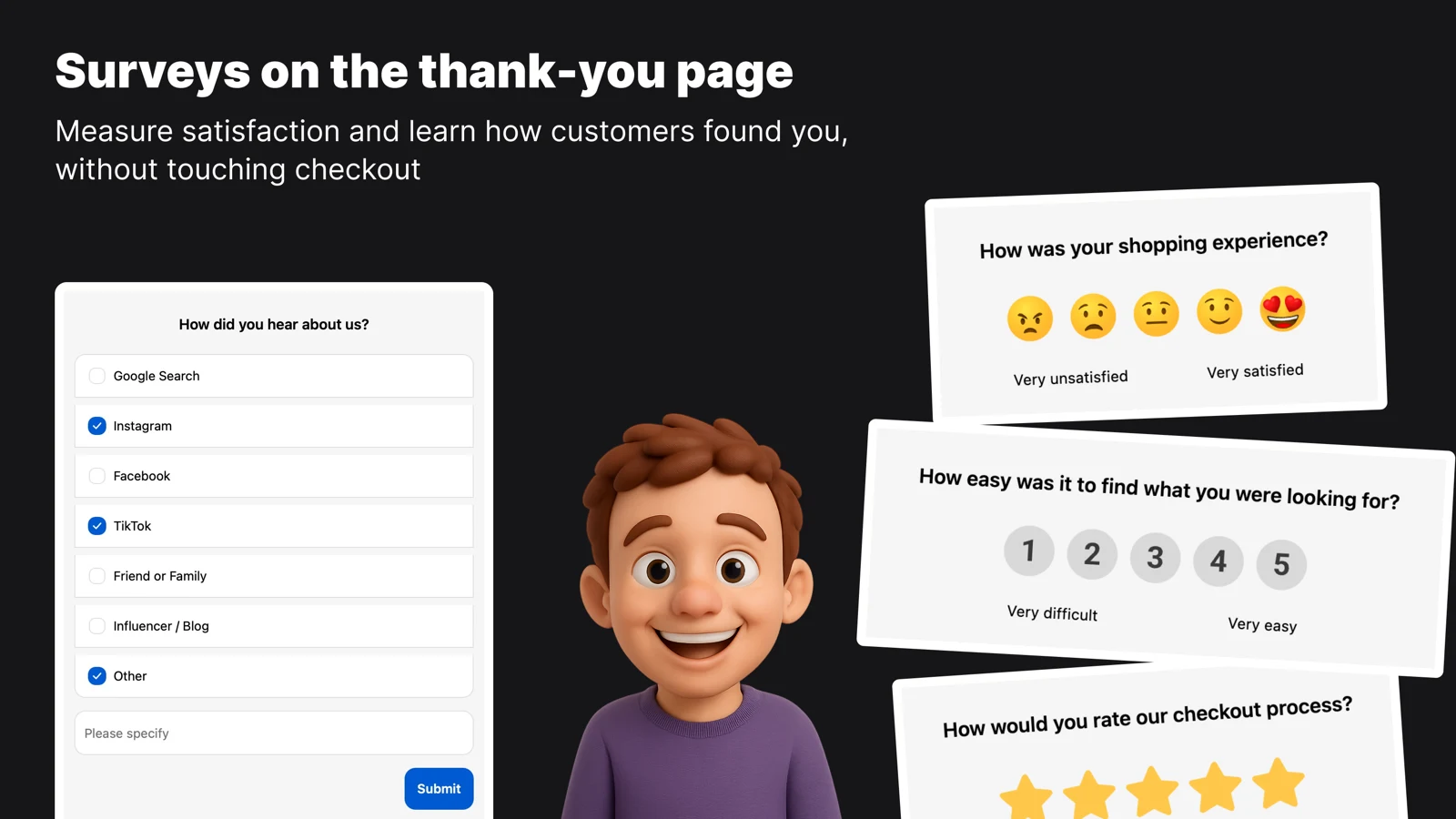
The new How did you hear about us survey works like this:
- It's independent of the CSAT survey. Enable either one, or both.
- Answer options are editable. Defaults are Google Search, Instagram, Facebook, TikTok, and Friend or Family.
- Customers can pick more than one channel. Discovery is rarely a single touch.
- An optional Other choice opens a free-text field for the channel you didn't think to list. Identical typed answers merge into one slice in the results chart instead of scattering into near-duplicates.
- Results get their own tab: a breakdown chart, a date filter, and every individual response listed in full.
- Each answer is stored against the order it came from, so a channel isn't just a percentage. It's a list of real orders you can open.
One honest limitation: the surveys render on the Thank you page only. The Order status page isn't supported.
The free plan includes both surveys, up to 100 responses per month, so you can have the attribution question collecting again today without spending anything.
What to do this week
If you haven't migrated yet, here's the short version:
- Open Settings → Checkout and copy everything out of the Additional Scripts box into a document, while you can still see it.
- Sort it into three piles. Tracking pixels move to Customer Events as web pixels. Plain content, messages, images, buttons, moves to Checkout Blocks for free.
- Anything that collected an answer from the customer needs a Shopify survey app that runs as a checkout UI extension. Install FT Post Purchase Surveys, turn on the satisfaction question, the attribution question, or both, and you're collecting again today. The free plan covers the first 100 responses a month.
The first two piles are covered by every migration guide out there. The third one is the pile this post is about, and the one most likely to sit broken for weeks before anyone notices.